

Report Studio: Generate Client PDFs
Data is only valuable if your client understands it. The Report Studio takes the raw, complex data from Google’s APIs and instantly translates it into a beautiful, agency-branded PDF deliverable.
The Core Concept: White-Label Automation
Building monthly reports manually in tools like Looker Studio or Canva takes hours of non-billable time. The EAP Report Studio reduces this process to roughly 30 seconds per client.
The system uses advanced, browser-native @media print CSS. This means your data never leaves your browser to be processed by a sluggish third-party PDF generator. It instantly restructures the active dashboard data into a clean 8.5×11 format, ready to be saved or printed.
How to Generate a Client Report
Ensure you have the correct client property selected in your top navigation dropdown, then follow these steps:
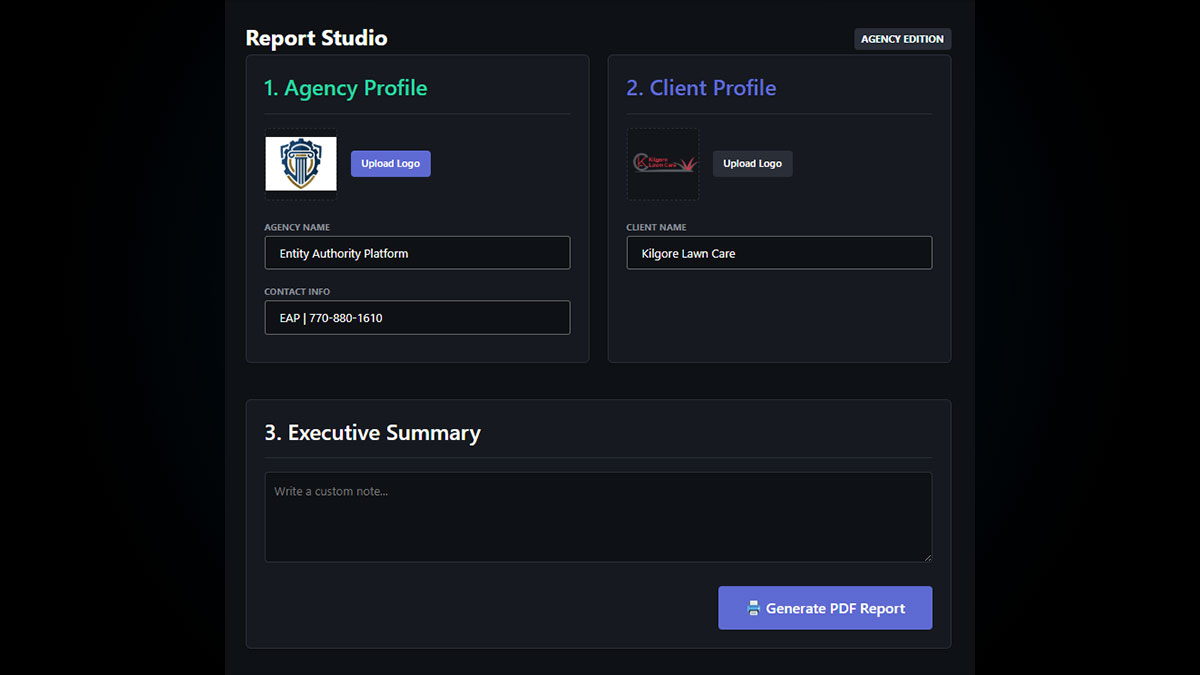
- Setup Agency Profile: Navigate to the Reports tab. Upload your Agency Logo and fill in your Agency Name and Contact Info. (EAP saves this locally in your browser so you only have to do it once).
- Setup Client Profile: Upload the specific Client’s Logo and verify their business name.
- Write the Narrative: Use the Executive Summary box to provide context. Don’t just paste numbers—explain why the numbers moved. Did you fix a cannibalization issue? Did a new schema payload trigger a rich result? Tell the story of your win.
- Generate PDF: Click the “🖨️ Generate PDF Report” button.
- Save as PDF: Your browser’s native print dialog will open. Change the destination printer to “Save as PDF”. Ensure that “Background graphics” is checked in your browser print settings for the best visual quality.
What the Report Includes:
- 30-Day KPIs: Total Impressions, Organic Clicks, and Average CTR.
- Visual Trend Charts: Day-by-day graphs for clicks and impressions.
- Keyword Intelligence: Top performing keywords and “Striking Distance” opportunities.
Ready to prove your value?
Stop wasting hours building spreadsheets. Generate an enterprise-grade deliverable in seconds.